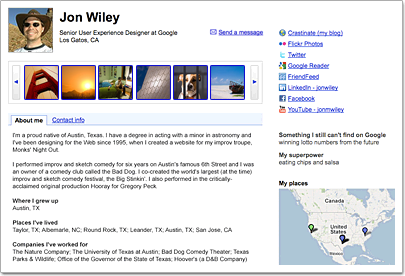
"Once you create your profile, Google automatically suggests links to some of the Google products you currently use. You can choose to display one or more of these links on your public profile.
Google will automatically detect which of the links are profiles, and distinguish them from other websites to help you better consolidate your identity on the Web. When you edit these links, you'll see the option 'This is a profile page about me' selected by default."
You will notice that all your Twitter accounts will be pre-selected to be the "true you" on the web because Twitter automatically adds the "me" relative to the HTML of your tweets. It feels a bit like Twitter "hijacks" your identity. It is good for SEO and Twitter since the profiles rank high in searches for your name but this should definitely be an opt-in feature rather than default.
@dreamingspires: Booo. Seesmic does the auto retweet thing and doesn't let you alter it. there must be a setting somewhere I can change.... [rummages]...
@DrVes: @dreamingspires You can ask the founder - @loic sounds helpful... No, seriously...
@dreamingspires: @loic - do you know if I can change the seesmic settings so that it's not an automatic retweet but editable? @DrVes thanks - have just asked him. You're a mine of information.
@BiteTheDust: @dreamingspires I prefer to think of @DrVes as a mind of information Not as some dusty tunnel stored with archives.
@loic: @dreamingspires just use the "quote" option it's the old editable RT.
I follow a lot of "minds of information" on Twitter and Google Buzz and I am thankful to them and the web services that made this possible.
"Google is positioning Buzz to be a one-stop microblogging platform, allowing posting from Buzz to outside services, as well as using Buzz as an aggregation tool to collect posts from other services.
This may be the beginning of a true collapse of the current social silos that we have, where there is little interoperability between systems.
The current microblogging/status update situation is much like the early days of email, when you couldn't email someone who happened to be on another service provider.
I know that it's hard to believe now, but at one point if you were on Prodigy, you just couldn't email someone on AOL or Compuserve... they just didn't talk to each other. This is comprable to Twitter, Facebook, FriendFeed and more today."
The critical requirement for the success of any online social network is the growing number of users who achieve meaningful communication through the network. Google Buzz does not have that yet and it's adoption by the users seems to have already plateaued.
In contrast: Tweets grew 1,400% last year to 35 million per day. Today, we are seeing 50 million tweets per day—that's an average of 600 tweets per second.
Robert Scoble: "I have far fewer followers here, but I've already noticed that my items here on Buzz get MUCH more engagement than items on Twitter.
This makes Google Buzz a LOT more fun for someone like me who looks for engagement rather than sheer numbers. What does this do? I've found I'm trying to "pay back" the compliment by reading a lot more on Buzz and "liking" and "commenting" on your items. On Twitter? All I can do is retweet or favorite and no one really seems to know I'm doing those things, while here I've already gotten several side conversations going because people noticed I showed up on their items."
Chris Nickson - My plan has been to hang back and wait for you lot to figure out how to use Buzz effectively before diving in. Seems slightly intimidating being able to write more than 140 characters!
Ves Dimov, M.D. - Well, I did not like the 140 character limit on Twitter to begin with and consequently I did not use it for years... I opened an account in 2007 (when it was "twitr") but did not use it until 2008-2009 when I saw that "everybody" was tweeting. Twitter snippets are just not good enough to report study abstracts and follow a conversation. In the meantime, I always felt that Friendfeed would be short-lived and waited for a better service. Google Buzz is not perfect but is a step in the right direction.
Also, the use of URL shorteners may be a bit short-sighted. What happens when bit.ly runs out of money? Hopefully, goo.gl (Google URL service) will be around a bit longer.
Heidi Allen - Hi Chris - yep, yet another thing to figure out - now don't forget to write your blog tweet about it post it on facebook and do a nice comment on it on buzz
then connect your buzz to twitter via feedburner and post a buzz comment on twitter via posterous
EASY. Have you got a linkedIn group yet - you could post there too....?
Ves Dimov, M.D. - "write your blog tweet about it post it on facebook and do a nice comment on it on buzz then connect your buzz to twitter via feedburner and post a buzz comment on twitter via posterous"
Sounds like a full-time job to me... :) This won't work for most doctors.
Buzz search is way better than Twitter search. Buzzzy is Buzz-specific search engine, unrelated to Google (http://buzzzy.com) that works well with public updates.
1. Format your posts.
2. View a summary of your own Buzz activity at www.google.com/dashboard.
3. Use an @reply to send a post directly to someone's inbox. Only you'll see their Gmail address — other people will just see their name.
4. Try keyboard shortcuts to fly through buzz.
5. Mute posts so they don't get sent to your inbox.
Among 5 more Buzz tips from the official Gmail blog: Post photos by email. You can post buzz by emailing buzz@gmail.com - handy for posting photos you take on your phone. Photos that you attach to your email will appear along with the subject line of your message.
"Email is the ultimate social network. If you take all the people I email with regularly, you'll quickly figure out my top relationships. Then you can build a social network out of that. And that's exactly what Google did with Buzz. But what I learned from that experience is that email is not one social network, it is many.
Many of the people that Buzz suggested I follow are people that I would never think of following on Twitter or friending on Facebook.
If you compare Google Latitude, where you broadcast your location, to Foursquare, where you explicitly checkin to a location, I think you'll agree that the explicit gesture is better."
At its heart, Twitter is dead simple: you type little messages into the box at Twitter.com — news, jokes, observations. Your messages show up on the screens of your followers, whoever’s signed up to receive them.
That simplicity has made Twitter a huge hit. But “simple” usually means “limited,” and Twitter is no exception.
Buzz is the new Twitter wannabe from Google.
Buzz isn’t nearly as much of a privacy concern. But don’t worry — it’s still got plenty of problems to go around.
At this point, you spend a disproportionate amount of your Buzz time absolutely baffled. But remember, it’s a Web site. It can be improved at any time — and Google has been making changes at an astonishing pace, even in its first week of operation.
Not surprising for a Google product, but Buzz search works much better than Twitter.
I use both services as public notebooks and I'm happy to report that I can actually find my old notes on Buzz. Not so much on Twitter because its index goes back only 7 days...
Google added a new option that lets you disable Buzz, but you need to delete your Google Profile...
Even if you delete the profile, you'll still be able to create another profile later and you won't lose your Google account.
After you click on "Yes, delete my profile and posts", you'll notice that you didn't actually disable Google Buzz completely. You've deleted all your posts, removed your connections and the people you were following, but the Buzz section from Gmail is still there and you still have the same followers. Now you can click "turn off Buzz" and you'll disable Google Buzz.
View a summary of your own Buzz activity at www.google.com/dashboard. The Google Dashboard provides a private, consolidated summary of the data associated with your Google account, as well as direct links to control your personal settings. As of today, Buzz has its own section on the Dashboard, so you can see how many people you're following, how many people are following you, and information about your recent posts, comments, and likes. You can also access your Buzz settings right there on the page:
I think Google Buzz is a real micro-blogging tool - not Twitter. You can actually edit your notes/updates in Buzz. For example, delete the ones that are redundant. Or expand a post rather than adding a tweet after tweet to explain your idea.
Useful keyboard shortcuts for Google Buzz include:
- Switch between Gmail and Buzz with keyboard shortcuts: G+I (Go to Inbox) and G+B (Go to Buzz). You must enable keyboard shortcuts from Gmail settings of course.
- Scroll down/up - hit J or K
- "Mute" a post - hit M
- There are even easier to remember shortcuts - "N" - Next message (scroll down the page) and "P" - previous message (scroll up)
- "U" refreshes your page in Google Buzz
Publish an update: Tab + Enter
I'm glad there is a simple way to solve some of the information overload in Google Buzz - hit "N" (next) to select a post, then "M" to mute it - this post and all its comments will disappear from your updates stream.
"Google Buzz is RSS-enabled. If you want to subscribe to someone's Buzz in your feed reader, just go to their Google profile page. Once there, you'll see the orange RSS icon appear in the browser's address bar. Click the icon in order to add Buzz to your feed reader."
Arin Basu - The way I usually "rebuzz" is to copy the buzz address (right click on the 'time' on the left of the dropdown box at the corner), click on comment, hit "email" and send the post to "buzz@gmail.com". Shows up as public buzz. Seems too many steps. Can anyone offer a simpler solution?
From EdBennett: Here's a good explanation of the Google Buzz privacy problem - http://bit.ly/9zX65M and how to disable the service and fully delete all traces of it: http://bit.ly/9gWODp
Some people don't like Google Buzz at all and I see their point...
A relative example: EdBennett's tweet: "I've just turned off Buzz - unfollowed / blocking everyone on the list. Take no offense, I just want to start fresh and get a handle on it."
Reference: Buzz off: Disabling Google Buzz - CNET http://goo.gl/ViDG - This seems to be a big deal for a lot of people. Privacy is paramount of course.
Please have in mind that just by your presence on the web (Twitter, Facebook, etc.), you give up a lot of your privacy. It's important to put things in perspective and have a clear long term perspective, acknowledging most other alternative view points.
@timoreilly: From a discussion of Google Buzz. Samuel Johnson: "Nothing will ever be attempted if all possible objections must first be overcome."
The current interface of Google Buzz is not made to follow a large number of users. One alternative would be to subscribe to the RSS feeds of the respective Google profiles and channel those through Google Reader. I already do that for many Twitter users with high number of daily updates.
Comments from my Google Buzz stream
Lakshman Swamy - "Privacy" is a vague term. For me, Buzz has privacy problems not because I am trying to hide what I am doing, but because my professional contacts probably don't want to see a stream of mundane/unrelated content from my end (personal), and vice versa. For me, I have distinctions between personal, professional, and academic interests. I would imagine similar issues exist for anyone that has more than a single purpose on the web.
Similarly, Buzz has too little structure. Right now, it is very much all or none, which makes for a tough decision when I'm following people like you who have prolific (and interesting) updates mixed in with personal friends who have much less often but equally (personally) interesting updates. Moreover, I end up seeing duplicate information in Buzz & Reader. I'm sure they'll devise better communication between those, though.
It is a fundamental problem: how do I share something I think is interesting to one group of people but not another, when both groups are following me? I guess using google groups is vaguely a solution...or I could just make multiple accounts!
Google Buzz: Go beyond status messages. Share updates, photos, videos, and more at http://www.google.com/buzz (the Gmail widget will be gradually rolled out to everyone).
Buzz is a "mixture" of Twitter, FriendFeed and a little bit of Google Wave
@pkedrosky: "Rather than trying to scare Twitter by releasing a pointless/irritating me-too product, Google should just buy Twitter."
See how Buzz looks when "attached" to a Google profile, for example: Michael Arrington
How to turn off Buzz in Gmail
Go to Gmail - Settings (top right) - 'Labels' - you can show/hide the 'Buzz' from Gmail inbox.
Alternatively, search for "turn off buzz" in Gmail inbox view and you will find the link at the bottom of the page, next to "turn off chat".
Disclaimer: All opinions expressed here are those of their authors and not of their employer. The information provided here is for educational purposes only and is not intended to provide medical advice. By accessing the web site, the visitors acknowledge that there is no physician-patient relationship between them and the authors.